


GuideAlong | GPS Audio Tours
4.61.18K Reviews
App Specs
- Version
- 2.3.4.4234
- Updated On
- License
- Free
- Downloads
- 100,000+
- Developer
- Gypsy Guide LLC
- Categories
- Travel & Local
- Platform
- Android
Screenshots
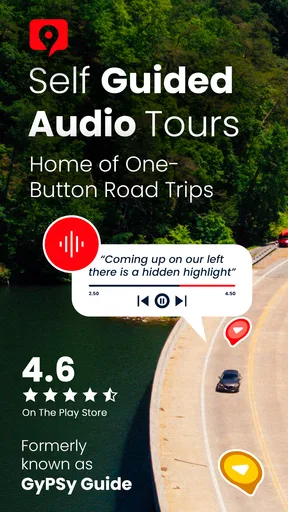
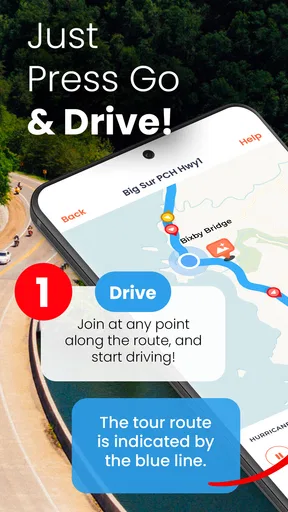
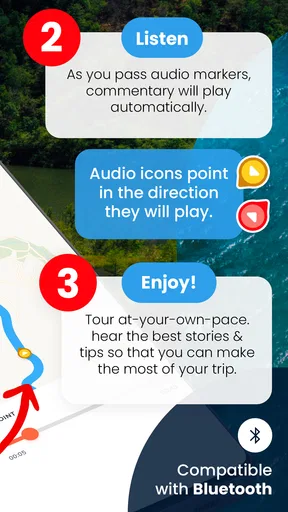
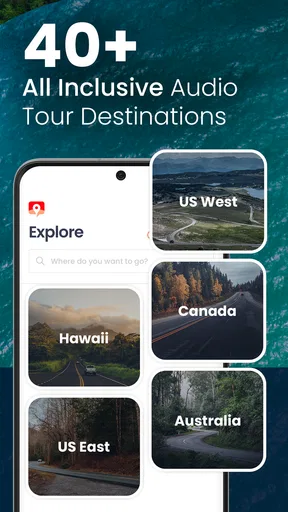

 Analysis by AppCompare
I see GuideAlong as a road-trip companion for people who want context while they travel, rather than another map telling them only where to turn. It is a travel app from Gypsy Guide LLC, built around location-triggered narration for scenic drives and sightseeing routes. The idea is simple: keep your attention on the journey, and let the app add stories when the road takes you somewhere worth noticing.
That focus makes it most appealing when the drive itself is part of the holiday. A long stretch through a national park, a coastal road, or an unfamiliar region can otherwise become a sequence of turns and photo stops. Here, the narration can give those miles a sense of place. I would not treat it as a replacement for navigation or trip planning, though; it is better understood as an extra layer that sits alongside those tools.
What the current version is for
The app is free to install, with a 4.6 average from around 1,500 ratings and more than 100,000 installs. Its current version is 2.3.4.4234, and it is rated Everyone. Those figures suggest a well-established niche rather than a brand-new experiment, but they do not tell me whether a particular tour suits a particular trip. I would check the available route coverage before building an itinerary around it.
GuideAlong is aimed at self-guided road travel in the United States, Hawaii, and Canada. That regional focus is useful if your plans fit those destinations; it is less compelling if you need a general city guide or a walking-tour app for places elsewhere. The app is free to download, but in-app purchases range from $0.99 to $119.99 per item, so I would look at the tour options and their prices before assuming that every route is included at no cost.
What changed, and what that means for returning users
The app was released on February 12, 2021, and version 2.3.4.4234 is the current version. That gives existing users a concrete reference point when checking that they are running the latest build, but the version number alone does not show which features have changed or how the app has evolved. I would avoid reading a particular improvement into it without a version history to support that conclusion.
For someone who already uses the app, the sensible approach is to review the current tour choices before the next drive and make sure any needed audio is ready ahead of time. The core appeal remains the same: location-aware stories rather than a fixed playlist. Travelers new to the app should also think about how they will handle the route, phone battery, and listening setup before setting off, especially on a long day with limited chances to stop.
Where it fits—and where it does not
Compared with a standard map app, GuideAlong offers more narrative and less emphasis on getting from A to B as quickly as possible. Compared with a live guide, it gives you more control over when to pause or explore, but it cannot respond to questions or change the plan to suit your group. I find that trade-off attractive for flexible scenic drives, while a human guide or a focused museum tour is likely better when you want detailed interaction at a specific site.
Worth Reading Before You Choose

Flipboard Shows What News Apps Must Do Beyond the Feed

Switching to Android Auto Means Rethinking Your Driving Routine

Google Calendar Makes a Crowded Week Easier to Manage

Ludo King Makes the Most of the Minutes Between Plans

Baby Panda World Brings Quick Play to Modern Phones, but Its Game Library Feels Busy

ESPN’s Live Game View Makes Following Close Games Easier
There are practical limits to keep in mind. Audio is not ideal for every passenger or every road condition, and the driver should never be distracted by browsing while the vehicle is moving. A passenger can handle the app, or the driver can set things up while parked. Downloading tour content before entering areas with weak coverage is also a sensible precaution; offline preparation helps with connectivity, but it does not remove the need to manage battery life and safe driving.
Getting Started with GuideAlong
First things first, downloading GuideAlong is a breeze. It's available on both Android and iOS, so no matter what device you’re rocking, you’re covered. Once installed, you’ll find the interface refreshingly straightforward. It's got that clean, intuitive design that even a non-techie can navigate without breaking a sweat.
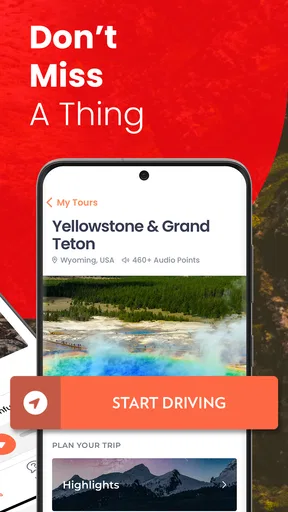
Upon opening the app, you’re greeted with a map and a list of available tours. The app cleverly uses your location to suggest tours nearby, which is super handy if you're unsure where to start. You can also browse a wide range of tours across various locations, from bustling cities to serene national parks.
The Tour Experience
Now, the real magic happens when you start a tour. As you drive, GuideAlong plays audio clips that are perfectly timed with your location. It's like having a travel buddy who knows all the best stories and historical tidbits about your surroundings. The narration is engaging and packed with interesting facts that keep you entertained and informed.
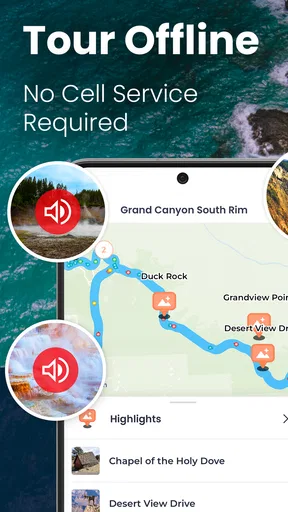
One of the coolest features is the offline mode. Let’s be real, cell service can be spotty in remote areas, and the last thing you want is your tour guide dropping out on you. With GuideAlong, you can download tours in advance and enjoy uninterrupted storytelling no matter where your journey takes you.
Why You'll Love It
What I really appreciate about this app is its versatility. Whether you're a solo traveler, a family on vacation, or just someone who loves exploring new places, there’s something for everyone. Plus, the app covers a diverse range of locations, from the iconic Grand Canyon to lesser-known gems.
The audio tours are available in multiple languages, making it accessible to a broader audience. And if you’re traveling with kids, there are tours that cater specifically to younger audiences, filled with fun facts and stories that’ll keep them entertained.
For a family, the most useful way to plan is to treat the tour as a flexible soundtrack, not a strict schedule. I would choose the route before leaving, download the relevant audio while connected, and agree that the driver will keep their eyes on the road while a passenger manages any choices. That small division of duties makes the experience calmer: the driver can concentrate, children can listen or tune out, and the group can still stop when a view or rest break feels worthwhile.
A solo traveler can use the narration differently. I would set everything up while parked, then let the app provide company on the drive without trying to read screens between turns. If a stop catches my attention, I can pause the journey and explore at my own pace rather than feeling pushed through a scheduled group itinerary. On the other hand, someone driving alone should be especially careful not to fiddle with the phone; convenience is not worth losing concentration.
Make the route work for your day
A practical scenario is a morning departure for a scenic drive with a few planned stops and an uncertain finish time. Before setting off, I would compare the tour’s route with the day’s destination, download what I expect to use, and keep a charger available for the phone. During the drive, I would let the narration fill otherwise quiet stretches, then pause it at viewpoints, meal stops, or when the group needs a break. This is a better fit than trying to listen continuously while juggling navigation, traffic, and a tightly timed reservation.
One useful trade-off is that location-based audio can make an ordinary stretch more interesting, but it also depends on traveling through the area the tour covers. It is not the same as choosing any topic from a podcast queue. If you take a substantial detour, change direction, or spend the day in a town outside the route, the narration may no longer match what you are seeing. I would keep a conventional map available for route decisions and use the audio as commentary, not as the authority on where to go.
Another tip is to think about listening conditions before you start. In a car with several people talking, younger passengers asking questions, or a noisy vehicle, narration may be harder to follow. A passenger can adjust the setup while parked, and the group can decide whether to listen together or simply dip in and out. If the story matters to you, avoid treating the audio as background noise; if conversation matters more, there is no reason to force the whole car to listen to every segment.
Choosing it over other travel tools
Many travelers already rely on mapping apps for directions, saved places, and traffic. Those tools are the better choice when the priority is efficient arrival, live route decisions, or finding a nearby service. GuideAlong serves a different purpose: it adds a narrated layer to a drive. Using both is more sensible than expecting one to do the other’s job. I would start navigation in the tool I trust for the route, then use the tour for the places and stories along the way.
It also differs from a conventional audio guide at a single attraction. A museum or walking tour usually concentrates on a bounded site and may offer close-up detail; this app is suited to travel across a broader driving route, where the point is to hear context as the scenery changes. A live guide remains the stronger option for questions, personal recommendations, or adapting the pace on the spot. GuideAlong is more appealing when independence and a flexible departure time matter more than conversation.
The app is not the best match for a trip built around dense urban walking, public transport, or destinations outside its United States, Hawaii, and Canada focus. It may also be unnecessary if you enjoy quiet drives, prefer your own music, or already have a detailed human-led itinerary. I would skip it for a short commute or a route where you need uninterrupted attention on complex driving. Its value is clearest when the road is a meaningful part of the experience and you want optional context without committing to a group tour.
Costs, preparation, and the remaining unknowns
Because the app includes in-app purchases, I would check the price of the specific tour I plan to use before relying on it. The range runs from $0.99 to $119.99 per item, so the total can depend on what you choose rather than on the initial download alone. For a trip with several regions, compare the tours against the actual route and decide whether each one will get enough use. Buying broadly “just in case” is less sensible than matching purchases to confirmed travel plans.
Offline listening is a meaningful help in remote areas, but it is not a reason to leave preparation until the last minute. I would download the route while connected, open the app before departure, and confirm that the selected tour is the one I intended to use. I would also check the phone’s available battery and avoid assuming that downloaded content solves every practical issue: navigation, screen use, and audio playback can all make a long day harder on a device.
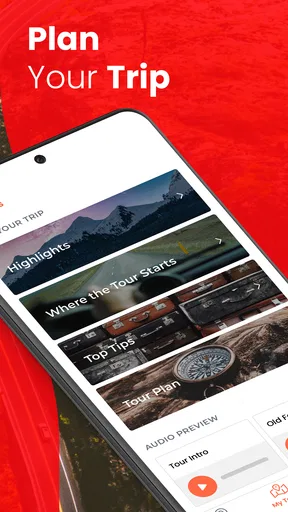
One detail worth checking for your own trip is the exact coverage of the route you intend to drive. A nearby suggestion is convenient, but proximity alone does not guarantee that a tour follows your planned road or includes the stops you care about. I would compare the tour area with the itinerary before setting off, particularly if the day includes detours or a one-way drive. That simple check helps avoid expecting narration in places the selected tour may not cover.
For language and family suitability, the app’s tours are presented as available in multiple languages, with some aimed at younger listeners. I would still choose a specific tour with the group in mind rather than assuming every route has the same language options or child-focused material. A family with mixed ages may be happiest sampling the narration together early in the drive, then deciding whether to keep it on for the rest of the route.
Who will get the most from it
I would recommend this app to travelers who enjoy scenic driving, want stories without booking a guide, and are comfortable doing a little preparation before departure. It is particularly appealing for a road trip where the itinerary has room for spontaneous stops. The app’s Everyone age rating makes it broadly approachable, but the right tour still depends on the interests and listening habits of the people in the car.
My recommendation is more cautious for anyone expecting a complete travel planner, a live navigation replacement, or a personal guide who can answer questions. It is also less useful if you do not want to spend time checking tour coverage and preparing downloads, or if your trip is mostly outside its supported regions. Those are not flaws in the idea so much as limits of a focused product; knowing them makes it easier to decide whether the purchase and setup are worthwhile.
Wrapping It Up
In a nutshell, GuideAlong is a must-have for any travel enthusiast looking to enrich their journeys. It’s like having a knowledgeable friend riding shotgun, sharing stories and insights that you’d otherwise miss. And the best part? You can enjoy these tours at your own pace, stopping whenever something catches your eye.
If you're planning a trip and want to make the most of your travel experience, give GuideAlong a shot. It’s more than just an app; it’s your passport to discovering the world in a whole new way. Happy travels!
What I would watch before the next trip
For returning users, I would watch for clear release notes that explain what a new version changes, rather than assuming a higher version number means a particular improvement. The current build gives a useful checkpoint, but travelers mainly need to know whether their chosen tours still suit their plans and whether the app behaves as expected on their device. Checking before travel is less stressful than sorting out an update at the roadside.
For first-time users, the most important question is practical: does the available tour match the route you are actually taking, and does its cost make sense for that trip? I would answer that before buying, then test the setup at home or while parked. If those basics line up, the app can add welcome texture to a drive; if not, a map, a local guide, or simply an unhurried playlist may serve the day better.
Pros
- Easy to use with intuitive interface.
- High-quality audio narration.
- Offline maps for remote areas.
- Wide variety of tour locations.
- Regular updates with new content.
Cons
- Limited free content available.
- GPS can drain battery quickly.
- Requires large storage space.
- Occasional GPS inaccuracies.
- No option for custom tours.
FAQs for GuideAlong | GPS Audio Tours
What is GuideAlong and how does it work?
GuideAlong is a GPS-powered audio tour app that provides narrated guides for various destinations. It uses your device's location to trigger audio commentary about the sights you’re visiting. Simply download the tour of your choice, and the app will automatically play audio descriptions as you approach points of interest, enhancing your travel experience.
Do I need an internet connection to use GuideAlong?
No, GuideAlong is designed to work offline. You need an internet connection to download the tours initially, but once downloaded, the GPS and audio features function without requiring data. This makes it ideal for traveling in areas with limited connectivity.
Is GuideAlong compatible with both Android and iOS devices?
Yes, GuideAlong is available for both Android and iOS platforms. You can download it from the Google Play Store or Apple App Store. The app is optimized to run smoothly on a wide range of devices, ensuring a seamless user experience across different operating systems.
Are there any additional costs after downloading GuideAlong?
While the app itself is free to download, individual tours may require a purchase. Some tours are available as in-app purchases. Always check for any costs associated with the specific tours you’re interested in before downloading them to avoid unexpected charges.
Can I use GuideAlong in multiple languages?
GuideAlong primarily offers tours in English, but some popular destinations may have options in other languages. It’s best to check the details of each tour to see if alternative language options are available. The app aims to expand its language offerings over time based on user demand.


